
Data
We are committed to providing users with a secure, efficient, and privacy-friendly way of data storage and management.
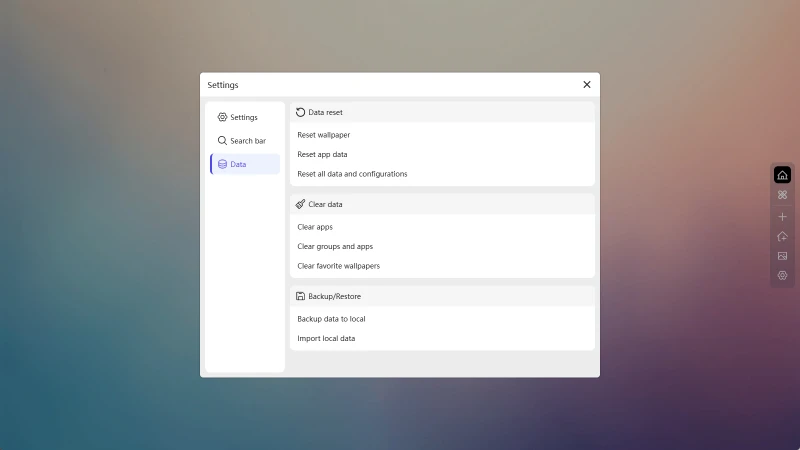
Data Backup
Select Backup Data Locally in the settings page. The system will generate a .zip file containing all your component data and configuration information. You can save it locally or manually upload it to a cloud drive.
Configuration and component data are default options. You can choose whether to export wallpaper data.
Using the one-click backup function will export your data into a file, helping you preserve your usage data when changing devices, reinstalling the browser, or in case of unexpected situations. It is recommended to regularly back up your data.
Data Restore
Select Import Local Data in the settings page. Choose a previously backed-up file, and all data will be restored to the state at the time of backup.
This operation will erase the current data and replace it with the new data, so please proceed with caution!
This operation will erase the current data and replace it with the new data, so please proceed with caution!
Data Reset
When you wish to restore to the initial state, we provide flexible reset options to ensure your actions are controllable and safe.
Available Reset Options
-
Reset Wallpaper
Restore the current custom background to the default wallpaper.
Does not affect component data and other settings. -
Reset Component Data
Clear all functional modules (such as to-do lists, notepads, bookmarks, etc.) and restore to the initial state.
Settings and wallpaper remain unchanged. -
Reset All Data
Restore to the default state at the time of installation, including wallpaper, component content, groups, layout, and all settings.
This operation is irreversible, please confirm with caution.
Resetting is irreversible. It is recommended to use the "Data Backup" function to back up your important content before resetting.
Clear Data
When you wish to clear all data, we provide flexible clearing options.
Available Clearing Options
-
Clear All Components
Delete all functional components.
Grouping and wallpaper settings remain unaffected. -
Clear Groups and Components
Delete all created groups and their included component data, leaving only a default group.
Settings and wallpaper remain unchanged. -
Clear Saved Wallpapers
Remove wallpapers that you have saved during use.
This function is useful when you have saved too many wallpapers and want to clear them all at once.
Clearing is irreversible. It is recommended to use the "Data Backup" function to back up your important content before clearing.